For your team's recurring meetings
Meetings where everyone gets their turn.
Ronde runs your team's recurring meetings. Everyone fills in a short check-in, the round table goes person by person on the shared screen, and the minutes write themselves.
Free and open source. No card needed.
Watch the video (1:21) Sarah
 Check-in

- 29ready-made templates
- 19free modules
- 10languages
- 1Docker Compose file to host it yourself
The video
Ronde in motion
A whole weekly meeting, from the check-ins to the minutes, in 1:21.
How it works
A meeting, from check-in to minutes
Before: a two-minute check-in
Each person writes what they did, what comes next and what blocks them, from a phone or a computer. Last week's plan is already there to tick off.
During: one turn each, on the big screen
The host runs the round from the control room: the timer, who speaks next, raised hands, reactions. The screen shows who has the floor and their check-in.
After: the minutes are ready
Decisions, actions with their owners and open topics are collected as you go. The minutes leave by email, chat or PDF as soon as the meeting ends.
Inside the app
See it at work
Real screens of the app, during the weekly meeting of a demo product team.
A check-in in two minutes, from any phone
Hugo writes what he did and what comes next, picks his mood, and saves. Last week's plan is already there to tick off.
One turn each, on the shared screen
The floor passes to the next person, their check-in shows up line by line, and the timer keeps the round on time.
The host moves on with one key
Next turn, timer, speaking order, raised hands. Notes taken during a turn become decisions and actions in the minutes.
Everyone takes part from their seat
Reactions, raised hands, questions and kudos are sent from a phone and show up on the shared screen.
The minutes are ready when you stop
Decisions, actions with their owners and the round table, written from the check-ins and the notes, ready to send.
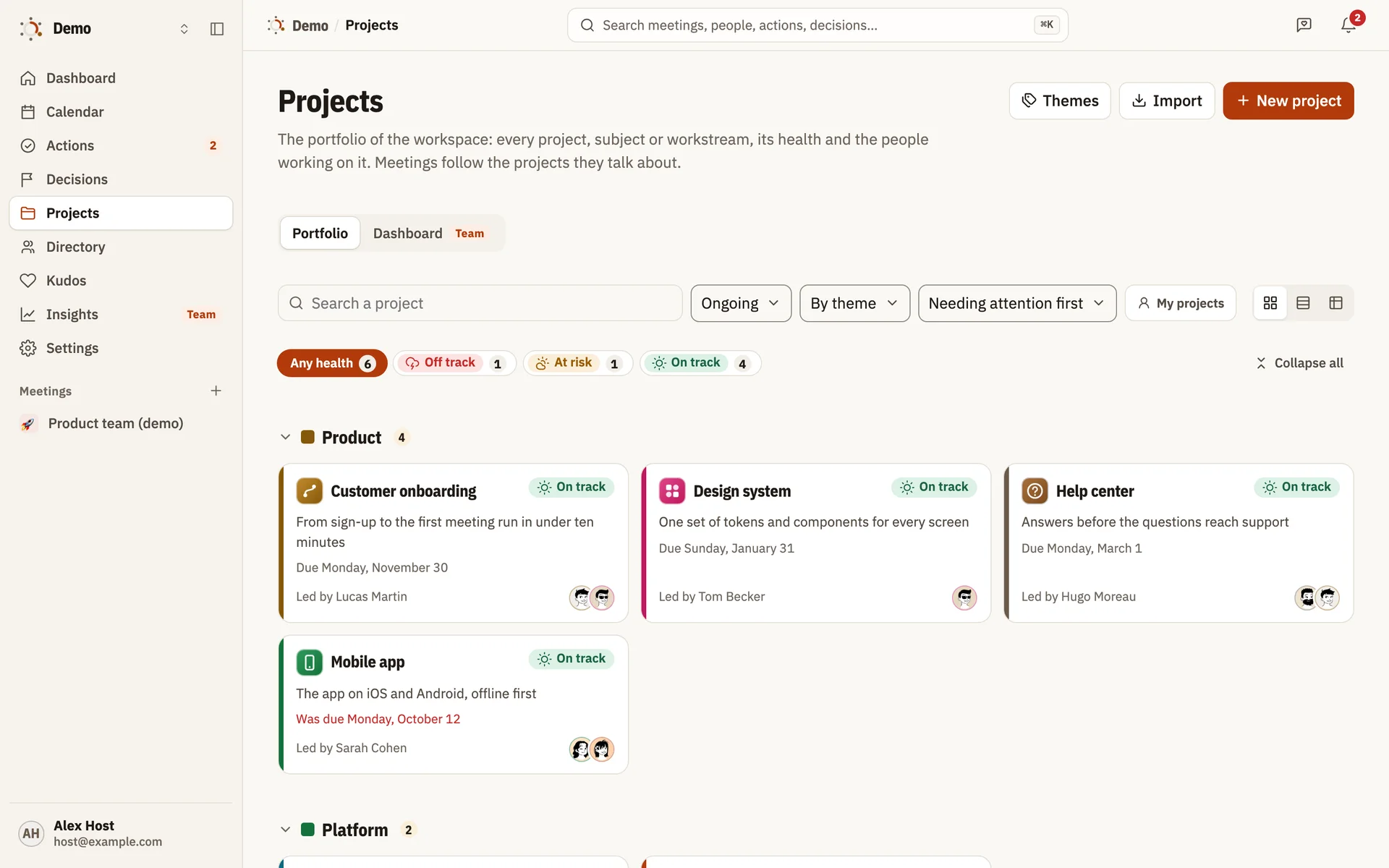
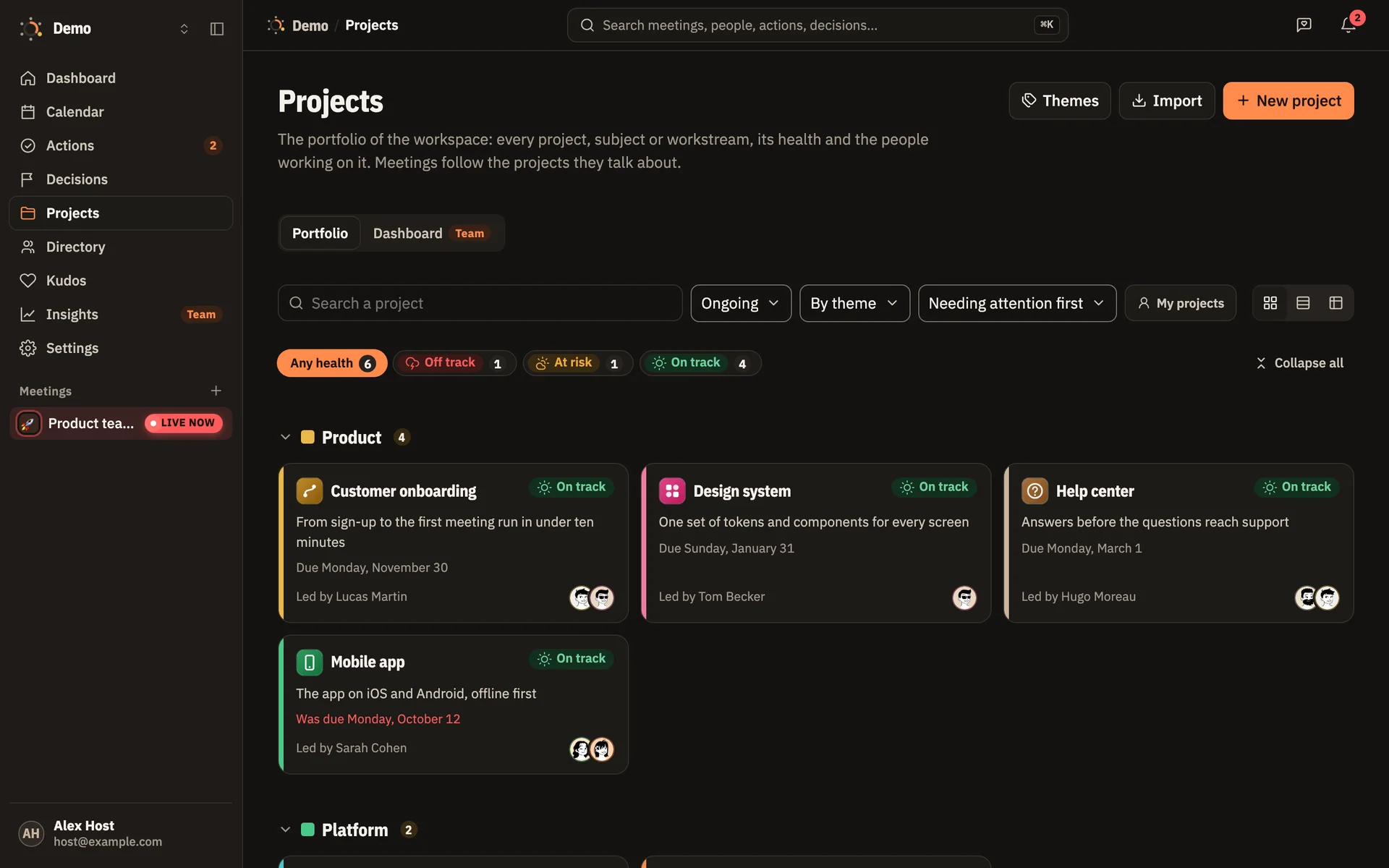
Every project, and how it is going
A portfolio grouped by theme, with the health of each project, updated by the people who work on it.
Templates
Not only for software teams
29 ready-made templates, from the daily stand-up to the class council and the shift handover. Each one brings its sections, its rhythm and the right modules.
- Product & content
- Leadership & sales
- Non-profits
- Field work
- Care teams
Modules
Small touches that keep the round lively
Turn on what your meeting needs, turn off the rest. Everything here is free.
Facilitation 11
Icebreaker
A question drawn from a bank to warm up; everyone answers in one line, shown during the intro.
Team mood
Everyone shares their mood (⛈️ to ☀️), shown anonymously and tracked in the stats.
Meeting usefulness
At the wrap-up, everyone rates how useful the meeting was, from 1 to 5, anonymously; the average is tracked in the stats.
Reactions and signals
Emoji reactions and signals (too long, louder…) flying across every screen.
Raised hands and questions
Raise a hand or ask a question during a turn: a questions step follows that turn.
Kudos
Thank a teammate during the meeting; kudos show on every screen and in the minutes.
Spotlight
Show a check-in item, a question or a message of your own in large type on the shared screen.
Random tools
A wheel to pick who goes next, a random speaking order, random teams, or heads or tails, played on every screen at once.
Birthdays
The waiting screen celebrates the birthdays of the week (day and month only).
Sounds
Waiting music, cues and a soundboard, played on everyone's screen or on the shared screen.
Seasonal ambience
Holiday and seasonal decorations on the waiting screen.
Organization 5
Rotating roles
Who facilitates and who takes notes changes at every session, in round-table order.
Timed topic
A topic of its own on the agenda, with its own duration and its notes in the minutes.
Polls
Ask the team a question during the session: choices, a scale or a word cloud, anonymous or not.
Parking lot
Set aside anything off-topic in one click; it becomes an open topic for the next session.
Decision log
Every “Decision:” line of the notes, from every session, in one searchable list open to the whole team.
Formats 3
Retrospective
Anonymous sticky notes in columns, grouped by the host, voted on by the team, then discussed; add it to the agenda.
Planning poker
The team estimates items with cards kept hidden until the reveal; add it to the agenda.
Async mode
No live session: everyone fills in their check-in and comments, then the digest goes out by email at the planned time.
Open source
Your server, your data
The Community edition is free software under the AGPL-3.0, with no limit on meetings or people. One Docker Compose file starts the app, its database and its migrations.
mkdir ronde && cd ronde
curl -fsSLO https://raw.githubusercontent.com/joinronde/ronde/main/docker/compose.yml
curl -fsSL https://raw.githubusercontent.com/joinronde/ronde/main/docker/.env.example -o .env
for v in POSTGRES_PASSWORD AUTH_SECRET SECRET_KEY; do
  sed -i.bak "s|^$v=.*|$v=$(openssl rand -base64 32 | tr -d '/+=')|" .env
done
rm .env.bak
docker compose up -dFree for schools and universities
Teachers, schools and universities get every paid feature of Ronde for free: class councils, teaching teams, department meetings.
In short
Ronde at a glance
- What it is
- Free, open-source software that runs a team's recurring meetings: check-ins before, a timed round table on the shared screen during, minutes and actions after.
- For whom
- Any team that meets every week or every day: product and engineering, sales, operations, schools and universities, associations.
- Price
- Community: free, without limits. Team: €3 per person per month billed yearly, or €4 monthly, counting only the people who took part in a meeting in the last 30 days. Enterprise: from €6 per person per month, billed yearly. Free for education.
- Where it runs
- In our cloud, or on your own server with one Docker Compose file. Self-hosted, it sends us nothing.
- Works with
- Any video call (Zoom, Google Meet, Microsoft Teams, Jitsi). Messages to Slack, Microsoft Teams, Mattermost, Discord, Matrix and email; the Slack app with Team, and the Microsoft Teams app on your own server.
- Languages
- English, Chinese, Hindi, Spanish, Arabic, French, Portuguese, Russian, German and Italian.
- License
- AGPL-3.0 for the core. The paid features are unlocked with a license key, checked offline.
What is Ronde?
Ronde is open-source software for a team's recurring meetings. Before the meeting, each person fills in a short check-in. During the meeting, the host runs a timed round table on a shared screen. After it, the minutes, decisions and follow-up actions are ready to send.
How is it different from a stand-up bot or a shared document?
A bot collects updates in a chat and a document collects them on a page, but nobody runs the meeting itself. Ronde covers the whole meeting: the check-ins before, each person's turn on the shared screen with a timer, raised hands and reactions during, and the minutes and actions after. Actions come back every week until they are done.
Does Ronde replace our video call?
No. Keep Zoom, Google Meet, Microsoft Teams or Jitsi: the host shares Ronde's Shared screen tab in the call, and everyone can also follow on their own screen. In a meeting room, the shared screen goes on the TV.
Is Ronde free?
Yes. The Community edition is free and open source, with no limit on meetings or people, in our cloud or on your own server. The Team plan, from €3 per person per month and counting only the people who took part in a meeting in the last 30 days, adds automation, AI and integrations; Enterprise adds company sign-in enforced per domain (SAML/OIDC), SCIM provisioning and governance. Schools and universities get the paid plans for free.
Can we host Ronde ourselves?
Yes. One Docker Compose file starts the app, its PostgreSQL database and its migrations. A self-hosted Ronde sends us nothing: no telemetry, and the license key is checked offline.
Which meetings is Ronde for?
Weekly team syncs, daily stand-ups, project reviews, retrospectives, one-on-ones, class councils, shift handovers and pipeline reviews, among others. 29 templates bring the right sections, rhythm and modules for each.
Which languages does Ronde speak?
Ten: English, Chinese, Hindi, Spanish, Arabic, French, Portuguese, Russian, German and Italian. Each person picks their own language, and the team picks the language of its emails and minutes. Arabic is shown right to left.
Is our data safe?
Each workspace's data is kept apart in the database, sign-in supports two-step verification, and the AI features stay off unless you turn them on. On your own server, nothing leaves your network.
Try it at your next meeting
Create a workspace, invite your team, pick a template. It takes a minute.